A verified start.
Create an account with your basic details and verify your email. Existing users sign in with email and a code. Your account connects the workspace; promotional preferences remain optional.
 Apply XGet Apply X for desktop Chrome
YOUR NEXT CHAPTER STARTS HERE
Save your profile, resumes and recurring answers.
Fill supported job forms, review the details and submit yourself.
Desktop Chrome required. Site support varies.
Version 1.6.2 requires a verified account.
On your phone? Copy the installation link and open it on your computer using Chrome.
MAKE ROOM FOR WHAT MATTERS
You've already told your story.
Apply X helps you stop typing it over and over.
Save your profile. Fill supported applications.
Review every detail. Keep your progress in sight.
BEYOND THE COMPANY CAREER PAGE
Reuse your details on supported web application forms. Preview changes, choose what to fill and keep your next opportunity in sight.


and more
Tested by the Apply X creator on LinkedIn, Naukri.com, Indeed and Greenhouse. Apply X is independent, with no portal affiliation or endorsement. Desktop Chrome only.
ONE PROFILE. MORE MOMENTUM.
Your experience, education, preferences and resumes. Ready when the next opportunity is.
Upload your resume, check the extracted facts and choose the file for each opportunity.
Version 1.6.2 update preview · Synthetic example data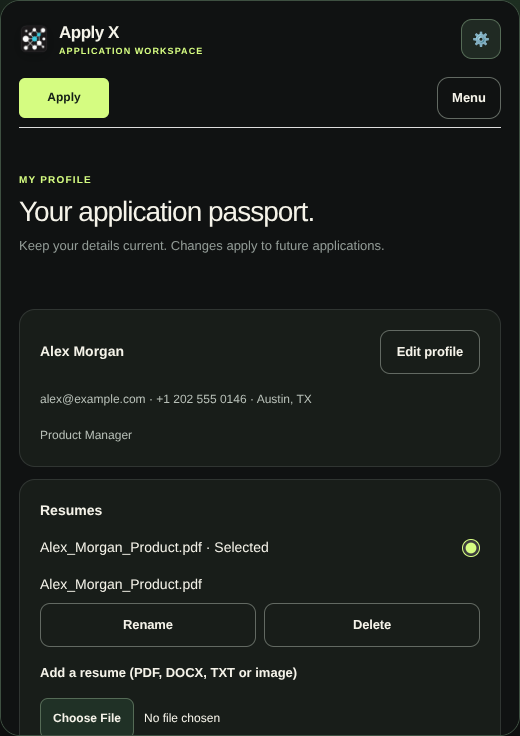
THE NEXT STEP FOR APPLY X
Create an account with your basic details and verify your email. Existing users sign in with email and a code. Your account connects the workspace; promotional preferences remain optional.
Upload a resume, review extracted facts and choose the file for each role. Enter total, relevant and management experience in years, months and days.
Review proposed values, choose ready fields and update supported choices. The preview reconnects as you move between application sections; final review and submission stay with you.
Use a dedicated tracker with editable role tags, stages, notes and follow-up dates. Goals and streaks have their own section.
Opt in to account backup when needed. Back up on one Chrome profile and restore on another. Backups are manual; restoring replaces the local workspace.
Search saved answers and prepared templates in Menu → Answers. Edit your own examples and review the facts before saving. This version does not activate a separate AI model or generate qualifications.
These previews show the 1.6.2 update with fictional demo data. Store availability follows review and rollout; check the Chrome Web Store for the currently available version.
Read the 1.6.2 update notesFOR THE DAYS YOU KEEP GOING
Set a 30, 60 or 90-day goal. Keep your application history organised. Build a streak with confirmed applications.
Progress you can see.
A routine you can return to.
Goals are plans, not job guarantees.
FROM INTENTION TO ACTION
Create or sign in to a verified account and complete your basic details. Open Menu → Profile to upload a resume, review extracted facts and save missing information.
Open the career application and choose “Apply to this role.” Allow site access when requested. Check the filled fields, selected resume and remaining questions before submitting. Site support varies.
Open Menu for Answers, Tracker, Streaks and Account. Search and review saved answers, manage application follow-ups and make a manual backup when you need one. Replay the Quick Guide from Apply.
YOUR INFORMATION. YOUR CHOICES.
Version 1.6.2 requires a verified account and basic contact details. Your working profile and resume stay in your browser by default. Optional account backup lets you manually save and restore your workspace on another Chrome profile. Backups happen when you request them; changes are not continuously synced.
Read our privacy policyApply X is the independent job application extension created by Parakram Raj Bhardwaj, with its official website at applyx.si and its verified installation link on the Chrome Web Store.
A FEW THINGS TO KNOW
Support depends on the site's form structure. Apply X helps fill supported fields; custom widgets and unusual forms may need manual input. Always review your application.
Yes, in version 1.6.2. Create an account with your name, email, phone number, city and country, then verify your email with a code. Existing users sign in with email and a code. Customer passwords are not required. Manage recovery on our account page.
Yes. Open Menu → Profile to edit details and manage resumes, and Menu → Answers for recurring answers and question templates. Save your edits. Changes apply to future fills; they do not alter applications already submitted to employers.
Open the dedicated Streaks section to manage your goals and reminders. Streaks use confirmed real applications in your selected timezone. Test and self-reported applications do not count. Reminders are optional Chrome notifications and depend on Chrome running and notification permissions.
Yes. Sign in to your account, enable cloud backup in your preferences and select “Back up this workspace” on your original profile. Sign in to the same account on your other Chrome profile and restore the backup. Restore replaces the local workspace; export local data first if you need to keep it. Backups include profiles, resumes, answers, application history, goals and streak data. Enable local reminders separately on each device.
You choose answers about gender, ethnicity, disability, veteran status and declarations yourself. Apply X does not infer these answers or automatically accept declarations. Supported selections can appear in the application review, but always check the employer’s page before submitting.
Check the email address and spam folder. The extension shows a delivery message and a 60-second resend countdown. When available, select “Resend code” and use only the newest code; codes expire after 10 minutes. Request limits may require a longer wait.
Uploading saves your resume locally and adds extracted contact details and explicitly labelled facts to Profile and Answers. Review them before applying. Manually edited values are preserved; scanned documents, complex histories and missing details may need manual entry. Eligibility, salary, demographics and declarations are not inferred.
Apply X attaches your selected resume on supported file controls, including hidden native inputs on active form steps. File-type restrictions and custom upload widgets may need your attention. Check that the career site accepted the attachment before submitting.
Tracker categorises application titles into role tags. Growth Manager and Assistant Growth Manager appear under Growth; Product Manager appears under Product. Hybrid titles can have more than one tag. You can edit the tags and filter your history.
Yes. Choose “Show me how Apply X works” on Apply. The updated Quick Guide opens the Menu toggle and shows where Profile, Answers, Tracker, Streaks and Account now live. Use Back, Next or Skip.
Apply X is available on the Chrome Web Store. Open the listing in Chrome and select “Add to Chrome”.
While the extension panel is open on a permitted career page, eligible answers you manually enter can be remembered locally for that application. Sensitive self-identification and consent choices are not stored for automatic reuse. Review saved answers before filling another form.
Version 1.6.2 uses a local searchable library of saved answers and prepared templates. Add your own examples and review them before saving. The separate Super Intelligence workflow is paused; this version does not send your questions to a model API.
MAKE SPACE FOR YOUR NEXT CHAPTER